
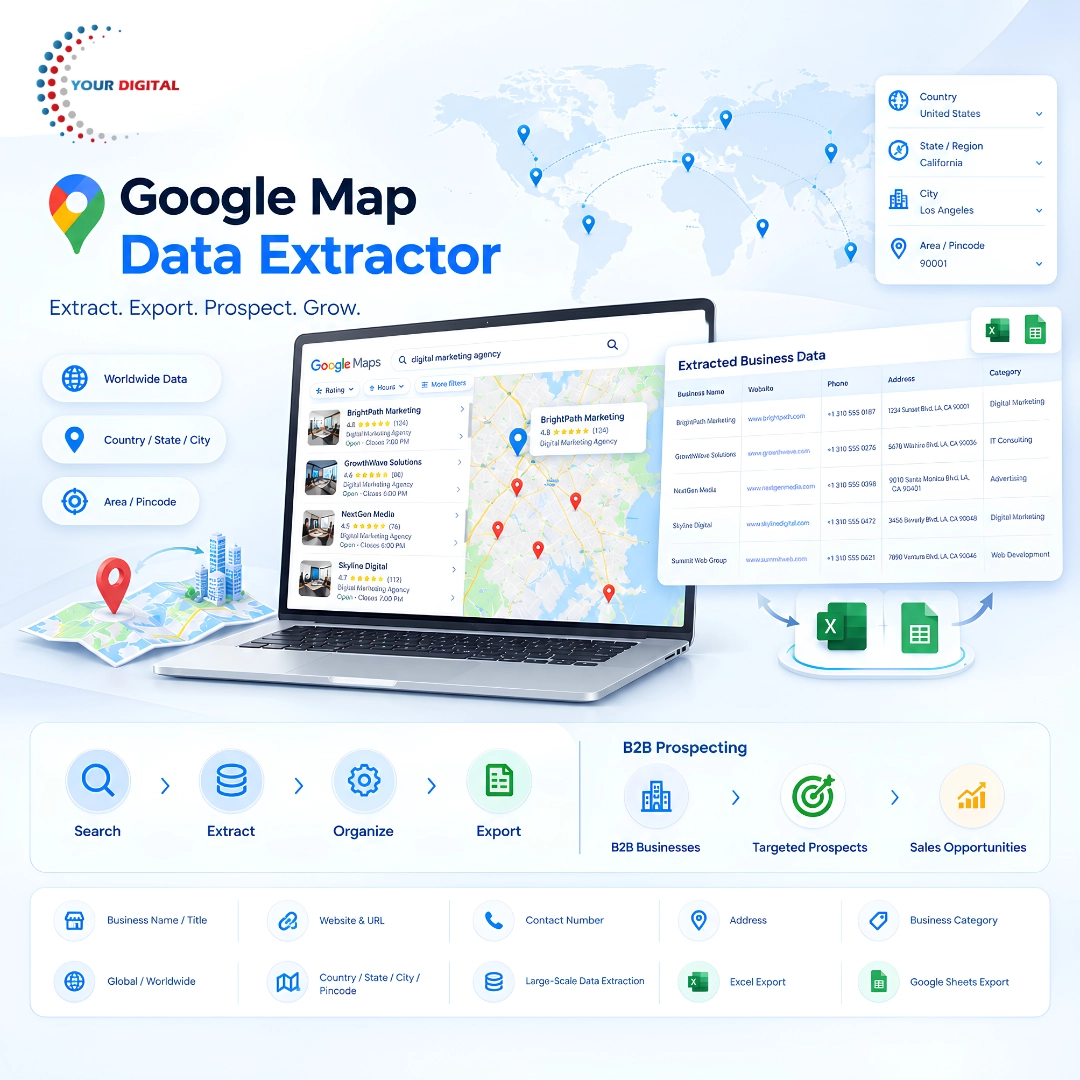
Google Map Data Extractor
Extract Business Data from Google Maps by Country, State, City & Pincode
Finding the right businesses for your sales team should not mean spending hours searching Google Maps, opening listings one by one, and manually copying information into Excel.
Google Map Data Extractor by Your Digital helps businesses discover and extract publicly available business information from Google Maps based on their target country, state, city, area and pincode.
Whether you are targeting businesses in India or exploring international markets, you can create location-focused datasets and turn them into practical prospecting lists for sales, marketing, market research and business development.
Find the Right Businesses. Extract the Data. Build Better Prospect Lists.
Instead of manually researching hundreds or thousands of business listings, you can create a structured dataset around the business category and location you actually want to target.
From local businesses in one city to prospects across international markets, Google Map Data Extractor makes location-based business research faster, more organized and easier to scale.
What Is Google Map Data Extractor?
Google Map Data Extractor is a business data extraction tool designed to collect publicly available information from relevant Google Maps business listings.
You can use it to discover businesses based on specific locations and business categories, then organize the available information into a usable dataset.
Depending on what is publicly available on the listing, extracted information may include:
- Business Name / Title
- Business Category
- Website
- Website URL
- Contact Number
- Address
- Location Information
- Other available business listing details
The collected data can then be exported into Excel or Google Sheets for further analysis, segmentation and sales workflows.
Why Use Google Map Data Extractor?
The challenge with traditional lead generation is often not finding businesses—it is finding the right businesses.
A generic database may contain thousands of records that are not relevant to your target market.
With Google Map Data Extractor, your prospecting process can start with the criteria that matter to you:
Business Category + Country + State + City + Area/Pincode
For example:
Digital Marketing Agencies → India → Gujarat → Ahmedabad
or
Manufacturers → UAE → Dubai
or
Real Estate Companies → United States → Texas → Houston
This location-based approach helps businesses create more focused prospecting datasets instead of depending only on broad, unrelated lead lists.
Key Features
1. Global Business Data Extraction
Research publicly available business information from Google Maps across international markets.
This is useful for businesses that want to:
- Enter new markets
- Find overseas prospects
- Research international industries
- Build country-specific lead lists
- Expand B2B sales territories
2. Country-Wise Data Extraction
Select a country and search for businesses relevant to your target market.
Whether your focus is India or another country, you can build location-focused business datasets based on the search requirements.
3. State-Wise Data Extraction
Target businesses within a particular state, province or region.
This is useful for territory-based sales teams, local agencies, distributors, suppliers and businesses expanding regionally.
4. City-Wise Business Data
Create targeted business lists for specific cities.
For example:
Ahmedabad → Manufacturing Businesses
Mumbai → Real Estate Companies
Delhi → Digital Marketing Agencies
Dubai → IT Companies
This makes the extracted dataset more relevant to a defined sales territory.
5. Pincode & Local Area Targeting
For highly targeted prospecting, you can work with pincode or local-area based searches where supported by the extraction workflow and source data.
This can be particularly useful when your business operates within specific territories or wants to build hyperlocal B2B prospect lists.
6. Website & URL Extraction
Identify publicly available business websites and URLs from relevant listings.
This can help sales teams research a prospect before approaching them and can also help agencies identify businesses that may have opportunities for:
- Website development
- SEO
- Digital marketing
- Lead generation
- Branding
- Automation
- Software solutions
7. Contact Number Extraction
Where a business publicly displays a contact number, the available number can be included in the extracted dataset.
This can help sales teams organize contact-based prospecting and calling workflows.
8. Business Name, Address & Category Data
Keep important business listing information organized in a structured format rather than manually copying records from individual listings.
This makes it easier to sort, filter and segment your prospect database.
9. Large-Scale Data Extraction
When a sales team needs a large number of prospects, manual research can become repetitive and inefficient.
Google Map Data Extractor is designed for large-scale data extraction workflows, helping you collect extensive business datasets based on your selected search criteria.
The practical amount of data available can vary according to the source, search parameters, publicly available information, technical conditions and applicable plan or usage limitations.
10. Export to Excel
Export extracted business information into Excel for:
- Lead management
- Sales team allocation
- Filtering
- Sorting
- Location segmentation
- Category-wise analysis
- Campaign preparation
11. Export to Google Sheets
Send your extracted dataset to Google Sheets for easy collaboration and workflow management.
Teams can review, filter, assign and manage prospects from a shared spreadsheet environment.
12. Designed for B2B Prospecting
Google Map Data Extractor is especially useful for B2B lead generation and business prospecting.
Instead of buying a generic database, businesses can create their own prospecting lists around specific industries and locations.
This is particularly useful for:
- Small businesses
- SMEs
- Agencies
- Sales teams
- B2B service providers
- High-ticket businesses
- Importers & exporters
- SaaS companies
- Consultants
- Business development teams
How Google Map Data Extractor Works
Step 1 — Select Your Business Category
Start by identifying the type of businesses you want to target.
Examples:
Manufacturers
Real Estate Companies
Hospitals
Hotels
IT Companies
Distributors
Schools
Restaurants
Digital Marketing Agencies
and many more business categories.
Step 2 — Select Your Target Location
Choose the geographic area relevant to your campaign.
You can structure your targeting around:
Country → State/Region → City → Area/Pincode
This allows you to build highly specific datasets for local, national or international prospecting.
Step 3 — Start Extraction
Run the extraction process to collect the publicly available business information associated with relevant Google Maps listings.
The tool helps reduce the repetitive task of opening listings and manually copying information.
Step 4 — Export to Excel or Google Sheets
Export the dataset and begin segmentation, analysis, sales assignment or other legitimate business workflows.
What Can You Do With the Extracted Data?
The real value of business data comes from how you use it.
A well-targeted dataset can support different business workflows, including:
B2B Cold Lead Generation
Build prospect lists based on your ideal business category and target geography.
Bulk WhatsApp Campaign Preparation
Use appropriate business contact data as an input for compliant WhatsApp outreach workflows, subject to applicable consent and platform requirements.
Bulk Calling
Organize publicly available business contact numbers into sales calling lists where permitted and appropriate.
Meta Custom Audience Preparation
Where the required identifiers, permissions and Meta requirements are satisfied, structured customer or prospect information can be prepared for relevant audience workflows.
Market Research
Research the presence of businesses in selected industries, locations and territories.
Territory Planning
Create city-wise, state-wise or region-wise business lists for sales teams.
International Prospecting
Research potential business opportunities across international markets without manually repeating the same search process for every location.
Agency Client Prospecting
Agencies can identify businesses in their preferred industries and locations that may need digital, technology, marketing or business services.
Who Can Benefit From Google Map Data Extractor?
B2B Sales Teams
Find businesses that match specific sales territories and categories.
Digital Marketing Agencies
Discover potential businesses for SEO, websites, advertising, social media and lead-generation services.
High-Ticket Service Providers
Create focused prospecting lists for premium consulting, software, technology, industrial and professional services.
Importers & Exporters
Explore companies and business opportunities across selected industries and countries.
Real Estate Businesses
Research companies, agencies and commercial businesses across targeted locations.
SaaS & Software Companies
Build industry-specific and location-specific prospect lists for business development.
Lead Generation Agencies
Create customized datasets for different client industries and geographic markets.
Industries You Can Target
Because Google Maps contains business listings across a wide range of categories, Google Map Data Extractor can support prospecting across industries such as:
Manufacturing, construction, real estate, logistics, healthcare, education, hospitality, travel, IT, software, professional services, wholesale, distribution, retail, automotive, finance-related businesses, agencies and many more.
The available information depends on what is publicly displayed for each business listing.
Why Location-Based Business Data Matters
Imagine you sell a high-ticket service in Ahmedabad.
Instead of approaching random businesses across India, you can begin with:
Ahmedabad → Your Target Industry → Relevant Businesses
Now imagine you want to expand internationally.
You can change the target to:
Dubai → Your Target Industry
or
London → Your Target Industry
or
New York → Your Target Industry
This creates a more structured approach to prospecting because your sales team begins with a defined market instead of an unorganized database.
Google Map Data Extractor vs Manual Research
Traditional Process
Search → Open Listing → Copy Details → Paste into Excel → Repeat
With Google Map Data Extractor
Define Target → Select Location → Extract → Review → Export → Prospect
The objective is simple: reduce repetitive research and make business discovery easier to scale.
What Makes Your Digital Google Map Data Extractor Different?
Your Digital is positioning Google Map Data Extractor as a specialized solution for businesses that need location-based business data extraction for B2B prospecting.
Its key advantage is the ability to combine:
Business Category + Geography + Publicly Available Business Information
This helps you create datasets specifically around the markets you want to pursue.
From local city-level prospecting to international business research, the same approach can be applied to different industries and locations.
Data Transparency
Google Map Data Extractor works with information that is publicly available through the source.
It does not create private information that is not publicly displayed.
If a business listing publicly provides a website, phone number, address or other supported information, that information may be available in the extracted output.
Because online business listings can change over time, the availability and completeness of individual fields may vary.
Always use extracted data responsibly and follow applicable privacy, marketing, telecommunications and third-party platform policies when using the information for outreach or advertising.
Frequently Asked Questions
What is Google Map Data Extractor?
Google Map Data Extractor is a tool for extracting publicly available business information from relevant Google Maps listings and organizing that information into structured datasets.
Can I extract Google Maps business data worldwide?
Yes. The solution is designed for both India and international business prospecting, subject to the availability of public listing information.
Can I extract data country-wise?
Yes. Country-based targeting can be used to focus your business research on specific international markets.
Can I extract state-wise and city-wise data?
Yes. You can structure your extraction around states or regions and cities.
Can I extract business data by pincode?
Pincode and local-area targeting can be used where supported by the workflow and available source information.
What information can be extracted?
Depending on the available listing information and supported fields, data can include business name, category, website, URL, contact number, address and additional listing information.
Can I export the data to Excel?
Yes. The extracted dataset can be exported to Excel.
Can I export the data to Google Sheets?
Yes. Google Sheets can be used for collaboration, filtering, review and sales management.
Is Google Map Data Extractor useful for B2B lead generation?
Yes. It is particularly suitable for creating industry- and location-focused B2B prospecting datasets.
Can I use the data for WhatsApp and calling?
The data can serve as an input for legitimate sales outreach. Actual WhatsApp messaging, calling and bulk communication must comply with applicable laws, consent requirements and the rules of the relevant platform or service.
Build Your Next B2B Prospect List From the Market You Want to Target
Stop spending your sales team’s time manually collecting one business at a time.
With Google Map Data Extractor by Your Digital, you can discover businesses by location and category, extract publicly available business information, export structured datasets and create a more focused prospecting workflow.
Reviews
There are no reviews yet.